Comparison Guide (2026)
The Best Google Groups Alternatives in 2026
The best alternatives to Google Groups for email groups are dedicated group email services: Gaggle Mail, Groups.io, Simplelists and self-hosted Mailman. They give a group one shared address, let members join and leave without a Google account, and keep a searchable archive. Below: why groups leave, what to look for, and a side-by-side comparison.
Last reviewed: September 2026
At a Glance: 4 Google Groups Alternatives Compared
Four services cover almost every group that leaves Google Groups. Here is how they compare on the things people ask about first.
| Service | Free tier | Members need an account? | Custom domain | Moderation | Archive | Support | Price for 500 members |
|---|---|---|---|---|---|---|---|
| Gaggle Mail | Up to 200 members | No, any email address works | Yes (Premium) | Built in, with approval queues | Searchable, private to members | 24/7 human support by email | About $50/mo (Standard) |
| Groups.io | Up to 100 members | No | Enterprise plan only | Yes | Yes; public groups are indexed by search engines by default | Email support | From $20/mo (Premium) |
| Simplelists | None | No | Limited | Basic | Basic | Email support | Priced by list size; from about £5/mo |
| Mailman (self-hosted) | Free software | No | Yes, on your own server | Yes | Yes (HyperKitty) | Community forums only | Free, plus your server and admin time |
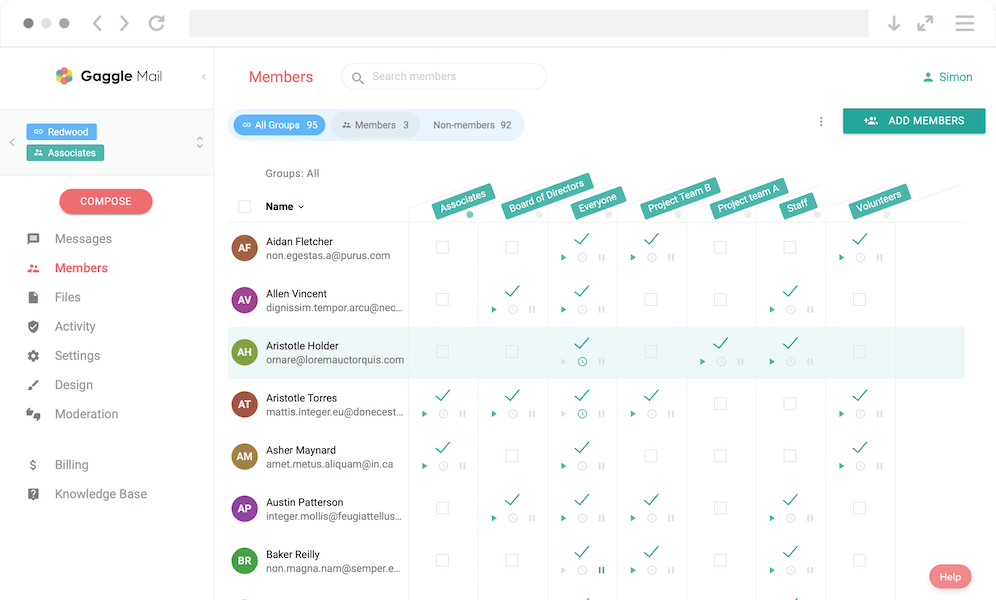
Your members keep the email address they already have.
Free for up to 200 members. No credit card.
Why People Leave Google Groups
Google Groups still works. It sends emails. It has an archive. So why are so many communities looking elsewhere?
Messages get silently moderated, with no way to fix it
The tipping point for many group owners is moderation they did not ask for. In a 5/5 G2 review from April 2026, a group owner described switching to Gaggle Mail after Google began holding back her group's messages without notifying anyone, and the community forum threads made it clear the issue was not going to be resolved. A good alternative gives you transparent moderation: clear queues, audit trails, and a real human to escalate to.
Everyone needs a Google Account
To reply via the web, manage settings or read the archive, every member needs a Google Account. That is fine inside a Google Workspace organisation, but it is a real barrier for HOAs, clubs and nonprofits whose members use Outlook, Yahoo, iCloud and everything else. A good alternative lets anyone join with the address they already have.
Privacy and data concerns
Google's business model runs on data, and your group's messages pass through Google's infrastructure under Google's privacy policies. For groups that discuss sensitive topics (churches, support groups, parent committees, professional associations), that is often the deciding factor.
No real customer support
Google Groups has no direct customer support: a help centre, community forums, and that is about it. When your HOA's 500-member list stops delivering on a Friday afternoon, "search the forums" is not a reassuring answer.
The interface feels dated
Google Groups has not had a meaningful design refresh in years. Settings are buried in nested menus, and basic tasks such as adding members feel harder than they should. The volunteer running your group should not need a Saturday to learn Google's admin console.
Limited customisation and branding
Google Groups emails look like Google Groups emails. You cannot add your logo, change the colours or send from your own domain, so messages never quite look like they came from your organisation.
Deliverability is a black box
Google Groups gives you almost no visibility into whether messages were delivered, opened or bounced. When members say "I never got that email", you have no way to investigate.
What to Look for in a Google Groups Alternative
Before jumping to a new platform, it's worth thinking about what actually matters for your group. Not every alternative is the right fit, and the best choice depends on your group's size, technical comfort, and needs.
Here's what we'd suggest prioritising:
- Ease of setup and day-to-day management. Can a non-technical person set up the group and manage members without a manual?
- No account requirements for members. Members should be able to participate using Gmail, Outlook, Yahoo, iCloud, or anything else they already use.
- Reliable email delivery. Look for active deliverability monitoring and visibility into delivery issues.
- Real customer support. When something goes wrong, you want a human being who can help.
- Customisation and branding. Your group's emails should look like they come from your organisation.
- Privacy and data ownership. Your group's messages and member data should belong to you.
- Fair, transparent pricing. No hidden fees, no sudden price hikes, and ideally a free tier for smaller groups.
Gaggle Mail vs Google Groups: A Detailed Comparison
Here's how Gaggle Mail and Google Groups stack up across the features that matter most.
| Feature | Gaggle Mail | Google Groups |
|---|---|---|
| Account required | No - any email address works | Yes - Google Account needed for full access |
| Setup time | Under 5 minutes | 10-30 minutes (more with Workspace) |
| Member management | Simple dashboard, bulk import, self-service join | Nested settings across Google Admin and Groups |
| Customisation | Logo, colours, custom domain (Premium) | Minimal, Google branding throughout |
| Customer support | 24/7 real human support via email | Help centre and community forums only |
| Privacy | No ads, no data harvesting, no tracking | Subject to Google's data and privacy policies |
| Deliverability | Monitored with delivery reporting | No visibility into delivery status |
| Message archive | Fully searchable, accessible to all members | Searchable, but requires Google Account to view |
| Moderation | Built-in moderation tools and approval workflows | Basic moderation available |
| Digest option | Daily digest for members who prefer less email | Available |
| Attachments | Up to 25MB (Free), unlimited (paid plans) | 25MB limit |
| Pricing | Free for up to 200 members; paid plans from $10/mo | Free (with Google Account); Workspace plans from $7.20/user/mo |
Where Gaggle Mail stands out
No account barriers for members. The biggest practical difference is the account requirement. With Gaggle Mail, your members just use whatever email address they already have. There's no signup wall, no Google Account needed, no friction. For community groups where members range from teenagers to retirees using every email provider under the sun, this alone is often the deciding factor.
Real human support, not help forums. Gaggle Mail's support team are real people who respond to emails quickly. They're available 24/7, and if you're stuck with something, they'll walk you through it or just fix it for you. When your group has 500 members and the annual meeting notice isn't going out, "search the community forums" is not what you want to hear.
Your data stays your data. Gaggle Mail is a paid service with a generous free tier. That means the business model is simple and transparent: you pay for the product, and your group's data belongs to you. There's no advertising, no data mining, and no ambiguity about how your members' messages and email addresses are being used.
Branding that reflects your community. Gaggle Mail lets you add your organisation's logo, customise the colour scheme, and on the Premium plan, send from your own domain. Your emails look like they come from your community, not from a tech platform.
Deliverability you can actually see. When you send a message to your group through Gaggle Mail, you get delivery reporting that shows you what happened. Bounces and delivery issues are visible so you can act on them.
A generous free tier. Gaggle Mail is free for groups up to 200 members. That covers the vast majority of community groups, clubs, and HOAs, no credit card required and no time limit.
Where Google Groups still makes sense
To be fair, Google Groups has its place. If your organisation is already fully on Google Workspace and every member has a Google Account, the tight integration with Gmail, Google Calendar, and Google Drive can be genuinely useful.
It's also completely free (outside of Workspace licensing costs), which matters for groups with zero budget and exclusively tech-savvy members who don't mind the interface. If your group needs deep integration with other Google services, Google Groups can still be a workable choice.
Try Gaggle Mail free for 30 days on any paid plan, no credit card required. Groups of up to 200 members are free for as long as you like.
Other Google Groups Alternatives Worth Considering
Gaggle Mail isn't the only option. Here's a quick, honest look at some other services you might come across.
Groups.io
Groups.io positions itself as a modern listserv replacement and offers a broad set of collaboration features beyond email, including calendars, file storage, wikis, polls, and chat. It's a solid choice if your community needs those extras. The free plan supports up to 100 members; premium plans start at $20/month. For a side-by-side look at the two dedicated services, see Gaggle Mail vs Groups.io.
Simplelists
Simplelists is a UK-based mailing list service that's been around for a long time. It offers a straightforward, no-frills approach to group email. Pricing starts at around GBP5/month. See how it compares with the other hosted services in our group email services comparison.
Mailman / GNU Mailman
Mailman is open-source mailing list software that you host yourself. It's free and highly configurable, but it requires technical expertise to set up and maintain. If you have a sysadmin on your team and want full control, Mailman is powerful, but for volunteer-run community groups it's usually more hassle than it's worth. See our guide to Mailman alternatives, or how to migrate from Mailman if you already run one.
Google Groups for Business (Workspace) vs personal Google Groups
There are two Google Groups. The personal version at groups.google.com is free with any Google account and is what most clubs and communities use. Google Groups for Business is the Workspace version: your organisation's admin creates groups on your own domain, can allow external members, and gets collaborative-inbox features. In both cases, people without a Google account can receive email from the group if the owner allows external members, but managing membership, reading the web archive or posting from the web needs a Google account. If most of your members are outside your organisation, that is the limit that matters, and it is the one every alternative on this page removes.
Migrating from Google Groups
Switching from Google Groups to Gaggle Mail is simpler than you might expect. You don't need to be technical, and you don't need to worry about losing your members or your message history.
Gaggle Mail has a dedicated Google Groups Migration Tool that handles the heavy lifting for you. Here's how it works:
- Export your data from Google Takeout. Head to Google Takeout and download your Google Groups data as a .zip file. This includes your members and your message archives.
- Upload the .zip file to Gaggle Mail's migration tool. Drag and drop the file or browse to select it. The tool automatically detects your groups, member lists, and archives.
- Review and customise. Rename groups, adjust email addresses, and choose which groups to import before anything is created.
- Click once to create your groups. Your groups are set up with members and archives intact, with links to manage each group right away.
- Let your members know. Send a quick note explaining the switch. Most members will keep replying to emails as usual.
The whole process typically takes less than an hour, and most of that is the Google Takeout export. If you'd rather not handle it yourself, get in touch and the support team will take care of the migration at no extra cost.
Members, archive and settings, from one Google Takeout file.
Free, and the support team will do it for you if you prefer.
Enterprise ready. Still simple.
Gaggle Mail runs group email for law networks, healthcare organizations, universities, and global institutions. That means we take security review seriously: independently audited, fully documented, and ready for your IT and procurement checklist, while staying simple enough that your members never notice any of it.
- SOC 2 Type 1 audited
- 99.9% delivery rate
- GDPR compliant
- TLS encryption throughout
- Single sign-on (SSO) & MFA
- 24/7 human support
Security questionnaire or procurement requirements? Email help@gaggle.email and we'll get you what you need.
Frequently asked questions
What people are saying
Join thousands of communities using Gaggle Mail
“Gaggle Mail transformed how our neighborhood association communicates. It's so intuitive that even our less tech-savvy members participate actively. The moderation tools are exactly what we needed.“

“Overall technical execution and ease-of-use make Gaggle Mail the best option in the market.“

“Solid, stable. Just works. Great interface. Works for everything we need.“

“Amazing alternative to google groups, which forces you to have a gmail account and is complex to join as a user.“

“Your service never fails and when we have questions, you respond immediately!“

“Outstanding service. Whenever we have a question or face an obstacle someone is there to assist.“

“It's straightforward. It works. No advertising banners. We love it!“

“The customer support is outstanding. Any questions we had while setting up our alumni network were answered promptly and thoroughly.“

“I love Gaggle Mail because I have never had a problem. It just works.“

“The migration from our old listserv was smooth and the interface is modern and clean. Our members adapted to it immediately.“

“I use it for a Boy Scout troop. I tried a couple of other applications and yours is by far the best.“

Need a better way to run group email?
Create a real group email address with privacy, replies, moderation, and archive built in.
Create your free groupTakes 2 minutes • No credit card