Comparison Guide (2026)
Best Mail-List.com Alternative - Modern Group Email (2026)
Mail-List.com was one of the original hosted group email providers. For over 25 years, it gave organisations a way to manage email discussion groups without running their own servers. It was a solid service in its day, and many loyal groups have used it for years, sometimes decades.
But the internet has changed a lot since Mail-List.com was first built, and the product has not always kept pace. If you are a Mail-List.com customer who has been putting up with a dated interface, limited customisation, and the nagging feeling that there must be something better out there, there is.
Gaggle Mail is a modern group email service built for the way communities communicate today. And if you are ready to switch, we will help you move across at no extra cost.
Why Mail-List.com Customers Are Switching
Mail-List.com still works. It sends emails. But after 25 years, the limitations have become increasingly hard to overlook.
The interface shows its age
There is no gentle way to put this: Mail-List.com's interface looks like it was built in the early 2000s, because it was. For group administrators trying to manage members, adjust settings, or troubleshoot an issue, the experience is clunky and unintuitive. For members visiting the archive or managing their preferences, it is even worse. In 2026, your group deserves an interface that does not feel like a trip back in time.
No customisation or branding
With Mail-List.com, your group's emails and web pages look like Mail-List.com. You cannot add your organisation's logo, choose your brand colours, or give the group any visual identity of its own. Everything comes in shades of grey. For communities that want their communications to feel professional and on-brand, this is a frustrating limitation.
Limited member self-service
On Mail-List.com, members cannot easily manage their own settings. Want to switch from individual messages to a daily digest? Need to update your email address? In many cases, the group administrator has to make these changes on your behalf. That creates unnecessary work for admins and a poor experience for members.
Expensive migration fees
If you want to bring your message archive across from another service, Mail-List.com charges a $100 fee to import it. That is a significant cost for a basic data transfer, and it creates a barrier that makes it harder to evaluate the service properly before committing.
Deliverability troubleshooting is limited
When messages do not arrive, and with email, this happens, you want tools and visibility to understand why. Mail-List.com offers limited insight into delivery issues, making it hard to diagnose problems when members report missing emails.
Gaggle Mail vs Mail-List.com: How They Compare
| Feature | Gaggle Mail | Mail-List.com |
|---|---|---|
| Interface | Modern, clean, intuitive | Dated - designed 25+ years ago |
| Customisation | Logo, colours, custom domain (Premium) | No branding options |
| Member self-service | Members manage their own settings | Admin must make most changes |
| Pricing | Free up to 200 members; paid from $10/mo | Paid plans only |
| Archive import fee | Free - we handle migration at no cost | $100 fee |
| Customer support | 24/7 real human support via email | Email support |
| Deliverability | Managed with delivery reporting | Limited visibility |
| Moderation | Built-in moderation and approval workflows | Basic moderation |
| Digest option | Daily digest for members | Available |
| Attachments | Up to 25MB (Free), unlimited (paid) | Attachment support |
| Account required | No - any email address works | No |
Where Gaggle Mail makes a difference
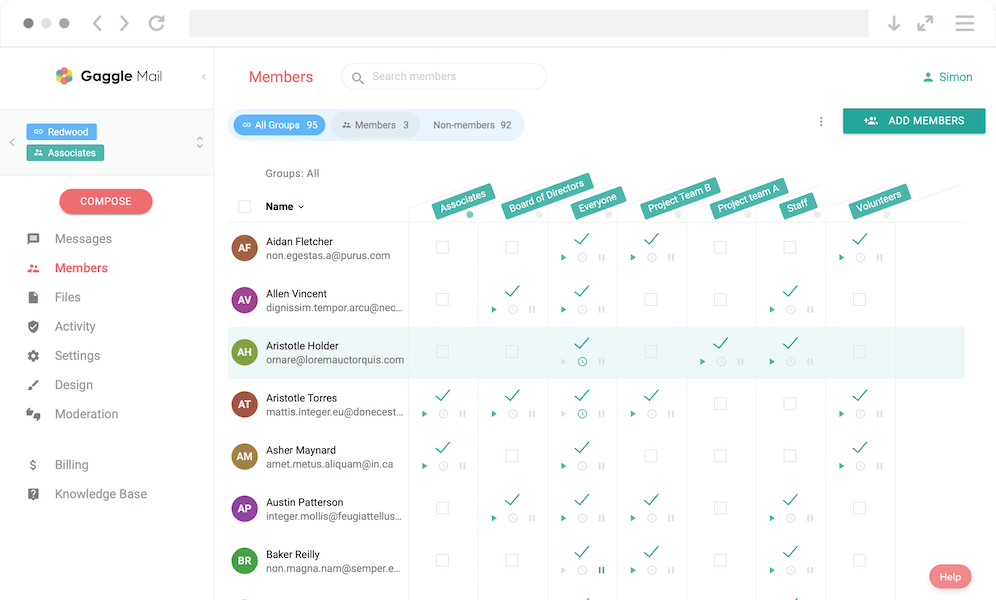
A platform you will be proud to share. When you invite new members to your group, the experience should reflect well on your organisation. Gaggle Mail's interface is clean and modern, whether your members are viewing the message archive, managing their preferences, or reading emails. First impressions matter, and your group email should not be the thing that makes your community look behind the times.
Branding that is actually yours. Add your logo, pick your colours, and on the Premium plan, send from your own domain. Your group's emails look like they come from your community. This is not just cosmetic, it builds trust and recognition, especially for groups that communicate regularly with their members.
Members manage themselves. With Gaggle Mail, each member has access to their own settings page where they can switch between individual emails and daily digest, update their preferences, and manage their subscription. That means fewer admin requests and a better experience for everyone.
No fees to switch. Gaggle Mail does not charge for migration. If you want to move your member list (and your archives, if applicable) across from Mail-List.com, the support team will handle it for you at no cost. No $100 import fees, no surprises.
Delivery you can see. Gaggle Mail provides delivery reporting so you know whether messages are reaching your members. If something bounces or lands in spam, you will know about it, and the support team can help you resolve it.
How to Switch from Mail-List.com to Gaggle Mail
The migration process is straightforward, and Gaggle Mail's support team can handle most of it for you.
- Export your member list from Mail-List.com. Download your current subscribers as a list of email addresses.
- Create your group on Gaggle Mail. Choose your group name and email address. This takes a couple of minutes.
- Import your members. Upload your member list, paste addresses directly or import from a file.
- Set up your branding. Add your logo and pick your colours. Make the group feel like yours.
- Let your members know. Send a quick message explaining the switch. For most members, the experience will be seamless, they will keep receiving emails and replying as usual.
If you would rather not handle any of this yourself, get in touch and the support team will take care of the entire migration at no extra cost.
Frequently asked questions
Ready to Upgrade Your Group Email?
Start for free - Gaggle Mail is free for groups up to 200 members, with no credit card required. If you are switching from Mail-List.com, the support team will handle the migration at no cost.
What people are saying
Join thousands of communities using Gaggle Mail
“Gaggle Mail transformed how our neighborhood association communicates. It's so intuitive that even our less tech-savvy members participate actively. The moderation tools are exactly what we needed.“

“Overall technical execution and ease-of-use make Gaggle Mail the best option in the market.“

“Solid, stable. Just works. Great interface. Works for everything we need.“

“Amazing alternative to google groups, which forces you to have a gmail account and is complex to join as a user.“

“Your service never fails and when we have questions, you respond immediately!“

“Outstanding service. Whenever we have a question or face an obstacle someone is there to assist.“

“It's straightforward. It works. No advertising banners. We love it!“

“The customer support is outstanding. Any questions we had while setting up our alumni network were answered promptly and thoroughly.“

“I love Gaggle Mail because I have never had a problem. It just works.“

“The migration from our old listserv was smooth and the interface is modern and clean. Our members adapted to it immediately.“

“I use it for a Boy Scout troop. I tried a couple of other applications and yours is by far the best.“