
Migration Guide · Updated June 2026
How to Migrate From LISTSERV to Gaggle Mail
If you have decided to leave LISTSERV, you are in good company. Most groups move on for the same handful of reasons: the cost, the dated interface, the command-line complexity, the quiet dependence on the one person who "knows how it works", and sales-led pricing you can't see without a phone call. The good news is that switching is straightforward — you keep your members, you keep your archives, and nobody has to learn anything new.
The short version
Export your subscribers, create a Gaggle Mail group, import your members, tell everyone the new address, then switch LISTSERV off. Most groups are up and running in well under an hour — and if you'd rather not touch a CSV at all, our support team will do the whole migration for you, free of charge.
- Why organizations leave LISTSERV
- Before you migrate — a quick checklist
- Step 1 — Export your subscribers
- Step 2 — Export your archives
- Step 3 — Create your group & import members
- Step 4 — Notify members & run in parallel
- Data loss & member disruption
- Gaggle Mail vs LISTSERV
- Who should not switch
- Frequently asked questions
Why Organizations Leave LISTSERV
LISTSERV is genuinely powerful software, and for some institutions it remains the right tool. But for most groups the running costs and the operational burden no longer add up. It's worth being specific about what people are actually leaving behind.
- Cost, and opaque pricing. On-premise perpetual licences from L-Soft publish price ranges only — roughly $2,875–$4,945 for LISTSERV Lite, $2,905–$19,435 for Classic, and $28,060–$29,440 for HPO — and you must contact sales for an exact quote. Hosted ListPlex layers a $500/node one-time setup plus $750/node yearly service on top of a support and delivery tier ($1,050–$4,400 plus a per-1,000-attempted-delivery charge). Notably, that hosting pricing is delivery-based, not member-based.
- A dated interface. The web UI broadly feels designed in the late 1990s, and members and admins alike find it unintuitive.
- Sysadmin-level setup and upkeep. Self-hosting LISTSERV means a server, a mail system, and someone who can maintain both.
- Deliverability is your problem. With self-hosted LISTSERV you own SPF, DKIM, DMARC, and IP reputation — get any of it wrong and your messages land in spam.
If you're still weighing the decision rather than committed to it, our Gaggle Mail vs LISTSERV comparison goes deeper, and what a listserv is covers the background. This guide assumes you've made up your mind and just want the mechanics.
Before You Migrate — a Quick Checklist
Five minutes of preparation saves a lot of back-and-forth later. Before you start, confirm:
- List-owner access. You'll need owner-level access and the list password to export subscribers and archives.
- Where your list is hosted. Determine whether you're on self-hosted LISTSERV or L-Soft's ListPlex hosting — it changes how you cancel at the end.
- Which archives you need. Decide whether you want the full history or just recent months.
- Your custom settings. Note your current moderation rules, digest options, and reply-to behaviour so you can recreate them.
- A member announcement. Plan a short note telling members about the switch and the new address.
Step 1 — Export Your LISTSERV Subscribers
Your subscriber list is the one thing you absolutely must bring across. LISTSERV gives you two ways to get it out.
Option A — the web interface
- Log in to your LISTSERV web interface as the list owner.
- Go to List Management → Subscriber Reports.
- Select your list.
- Set Report Format → CSV Format and click Update.
- Download the CSV file.
Option B — the email command
Prefer email? Send a message to listserv@your-host with the command in the body (not the subject):
List owners can also use QUERY to reveal any subscribers who have set themselves to CONCEAL, so nobody is left behind.
Tip: for a clean re-import you typically want one address per line (plus a name if you have it). Strip the LISTSERV header from the top of the export before importing.
Step 2 — Export Your LISTSERV Archives (optional)
If your group relies on past discussions, you can pull the archive too. LISTSERV stores archives as monthly "notebook" log files, so this is usually a handful of commands rather than a single download.
To pull specific posts rather than whole months, run a SEARCH first and then GETPOST to retrieve the matches.
Heads up: very old self-hosted instances may only retain recent months of archives. Check what INDEX reports before you assume the full history is there. If you'd like the archive brought across cleanly, our support team can help.
Step 3 — Create Your Gaggle Mail Group & Import Members
This is the quick part. Sign up for Gaggle Mail and:
- Create your group and choose its email address.
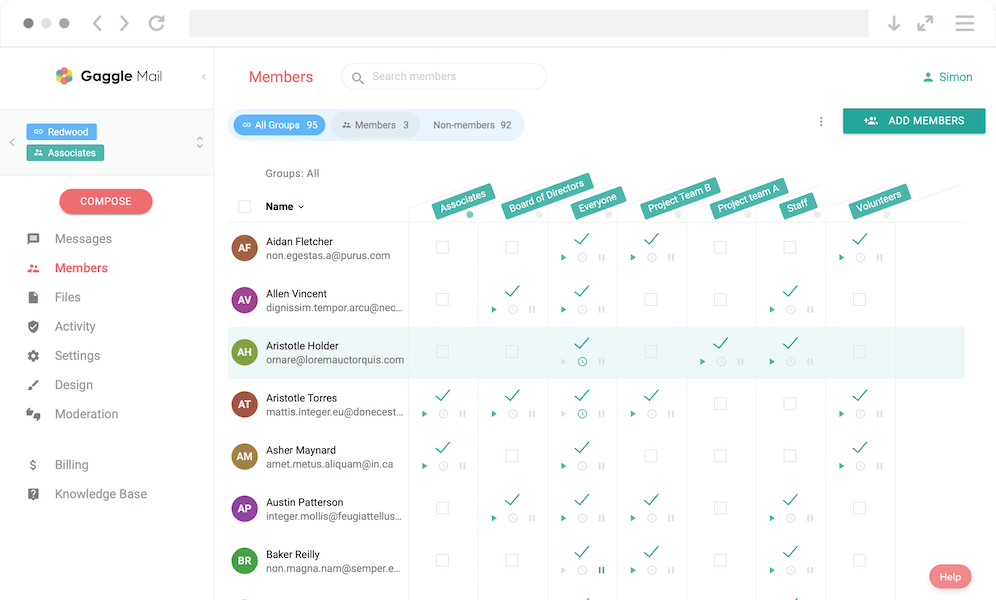
- Bulk-import your members — paste the addresses straight in, or upload the CSV you exported in Step 1.
- Configure moderation, digest, and reply-to to match your old LISTSERV setup.
- Add your own branding and hosted domain on a Premium plan if you'd like the group to feel like part of your organisation.
Step 4 — Notify Members & Run in Parallel
Send a short welcome message explaining the switch and the new group address. If you want extra reassurance, you can run both lists side by side for a few days: verify that messages are arriving reliably in Gaggle Mail, then decommission self-hosted LISTSERV or cancel your ListPlex hosting. Because members keep their existing email address, there's nothing for them to set up at their end.
Not sure where to start? Email help@gaggle.email and we'll handle the import and archive for you — at no charge.
Addressing the #1 Fear — Data Loss & Member Disruption
The biggest worry we hear is "what if I lose people or break something during the move?" It's a fair concern, and the answer is reassuring on every count:
- Members keep their email address. No Google account, no new login, nothing to install. They carry on emailing and replying from the inbox they already use.
- Your archive can come with you. The history you exported in Step 2 can be brought across, so past discussions aren't lost.
- We'll do the migration for you, free. Gaggle Mail's support team will handle the whole move at no charge — importing your members and bringing your archive over — so there's no CSV wrangling or command syntax to get wrong.
In short: members don't have to learn anything new, and nothing important gets left behind.
Gaggle Mail vs LISTSERV
| Feature | Gaggle Mail | LISTSERV |
|---|---|---|
| Setup time | Under 5 minutes | Days to weeks (self-hosted) |
| Hosting | Cloud, fully managed | Self-hosted or ListPlex |
| Pricing | Free to 200 members; paid from $10/mo | On-prem licence $2,875–$29,440; ListPlex node + support + per-delivery |
| Technical skill | None | Sysadmin |
| Interface | Modern | Dated |
| Deliverability | Managed, dedicated IPs / SES | Your responsibility (self-hosted) |
| Support | 24/7 human email support | Paid contracts + forums |
| Migration help | Free | N/A |
| Member account required | No | No |
Who Should Not Switch
In fairness, LISTSERV isn't wrong for everyone. If your organisation needs deeply customised on-premise workflows, tight LDAP or Active Directory integration, or compliance rules that mandate self-hosting your own mail infrastructure, you may be better off staying put. Gaggle Mail is built to take the operational weight off ordinary groups — associations, schools, nonprofits, HOAs, and faith communities — who want reliability, support, and branding without the IT overhead. If that's you, the move is an easy one. If you're an institution with hard self-hosting requirements, LISTSERV's configurability may still earn its keep.
Enterprise ready. Still simple.
Gaggle Mail runs group email for law networks, healthcare organizations, universities, and global institutions. That means we take security review seriously: independently audited, fully documented, and ready for your IT and procurement checklist, while staying simple enough that your members never notice any of it.
- SOC 2 Type 1 audited
- 99.9% delivery rate
- GDPR compliant
- TLS encryption throughout
- Single sign-on (SSO) & MFA
- 24/7 human support
Security questionnaire or procurement requirements? Email help@gaggle.email and we'll get you what you need.
Frequently asked questions
Have a different question and can't find the answer you're looking for? Reach out to our support team by sending us an email and we'll get back to you as soon as we can.
- How do I export my LISTSERV subscriber list?
- In the web interface, go to List Management → Subscriber Reports, select your list, set Report Format → CSV Format, click Update, and download the file. You can also email
REVIEW listname NOHtolistserv@your-hostto receive the full list by return email. Owners can useQUERYto reveal CONCEAL'd subscribers. - Can I keep my LISTSERV archives?
- Yes. Archives are stored as monthly notebook logs. Email
INDEX listnameto see what's available, thenGET listname.LOGyymmto download each month. Older self-hosted instances may only keep recent months. We're happy to bring the archive across for you as part of a free migration. - Will my members have to sign up for anything?
- No. Members keep their existing email address — no Google account, no new login. They receive and reply to messages from their normal inbox, exactly as they did with LISTSERV.
- How much does LISTSERV cost vs Gaggle Mail?
- LISTSERV is an on-premise perpetual licence with published ranges only (roughly $2,875–$29,440 depending on edition); you contact L-Soft for an exact quote. ListPlex hosting adds setup, yearly service, and a delivery-based charge. Gaggle Mail is free up to 200 members, then $0.10/member/mo (min $10/mo), with a 20% non-profit discount. See our pricing.
- Does Gaggle Mail help with migration?
- Yes — and at no charge. Our support team will import your members and bring your archive across for you, so you don't have to touch a CSV or a command line. Just email help@gaggle.email to get started.
- Is Gaggle Mail a good fit for institutions?
- Very much so. We support associations and education bodies who want reliable delivery, real support, branding, and searchable archives without the IT overhead. Organisations with hard self-hosting or deep integration requirements may prefer to stay on LISTSERV.
Ready to leave LISTSERV behind? Start your free migration today.
Free for groups of up to 200 members. All paid plans include a 30-day free trial, no credit card required — and our team will do the migration for you at no charge.