
The Definitive Guide · Updated September 2026
What is a Listserv?
A listserv is an electronic mailing list that lets a group communicate through one shared email address. Send a message to the list address and every subscriber receives it automatically. The name comes from LISTSERV, software created in 1986 by Eric Thomas; today most groups use simpler hosted services that do the same job.
A listserv is one kind of mailing list; the term covers announcement lists and marketing lists too. This guide covers where the word came from, how a listserv works, and what most groups use instead.
Quick answer
- What it is: a single email address that fans out every message to a list of subscribers.
- Where the word came from: LISTSERV, the original 1986 mailing-list software written by Eric Thomas.
- Who uses them: universities, professional associations, nonprofits, HOAs, faith communities, and any group that wants one shared address for discussion.
- How to run one today: use a hosted service like Gaggle Mail, or self-host with open-source software such as GNU Mailman.
- Modern alternatives: hosted group email services that work with any inbox - no Google or LISTSERV account required for members.
Where "Listserv" Comes From (1986)
LISTSERV is short for "list server", and the name belongs to a specific piece of software. It was written in 1986 by Eric Thomas, then a student in Paris, to automate something that until then had been a manual chore: keeping track of who was on a mailing list and forwarding their messages on. The software ran on IBM mainframes connected to BITNET, the academic network that preceded today's internet.
LISTSERV is still owned and developed by Thomas's company, L-Soft, and is licensed mostly to universities and large organisations. Over time the trademarked name became a generic verb. People say "I'm on the listserv" the same way they say "I googled it", and the word now covers any email-based discussion list, regardless of which software is actually behind it. If you are still wondering about the spelling, see our short note on listserv vs listserve.
How a Listserv Works Today
A modern listserv has one job: take an email sent to a single address and deliver a copy of it to every member of the list. The mechanics are straightforward.
- An administrator creates a list and gives it a single email address, for example
board@yourgroup.com. - Members are added (manually, by CSV import, or by self-service signup) and receive a welcome message.
- Anyone with permission to post sends an email to the list address.
- The listserv software fans the message out and delivers a copy to every subscriber's inbox.
- Members reply just by hitting Reply All in their email client - the conversation continues for everyone, no separate app required.
- The system keeps a searchable archive, applies any moderation rules, and tracks bounces and unsubscribes in the background.
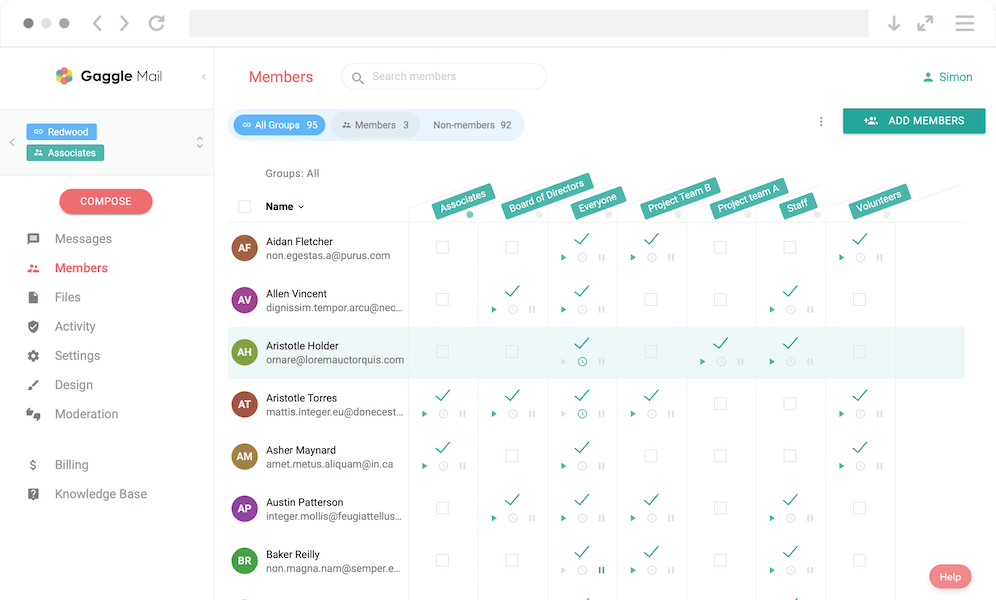
From the member's point of view, that whole process is invisible. They just see emails arrive in their inbox, reply when they have something to say, and unsubscribe with a click in the footer if they ever want out. The screenshot below shows what an admin sees when managing members in Gaggle Mail.
Listserv vs Modern Group Email: What Changed
Most people calling something a "listserv" today are not actually running L-Soft's LISTSERV - they are using a modern hosted group email service. Here is how the original software stacks up against a modern equivalent like Gaggle Mail across the things groups care about most.
| Feature | Classic LISTSERV | Modern group email (Gaggle Mail) |
|---|---|---|
| Account required for members | No - any email address works | No - any email address works |
| Hosting | Self-hosted on your own server (or via a LISTSERV reseller) | Fully managed cloud service |
| Cost | Commercial licence, typically thousands per year | Free for groups up to 200 members; paid plans from $10/mo |
| Ease of setup | Requires a sysadmin and a mail server | A few minutes through a web dashboard |
| Customer support | Enterprise support via L-Soft | 24/7 email support from real humans |
| Deliverability visibility | Server-level logs, requires technical know-how | Built-in delivery reporting and bounce handling |
For a wider view that includes Google Groups, Groups.io, Simplelists, and Mailman, see our full comparison of group email services. If you're specifically weighing up whether to leave Google Groups, our guide to the best Google Groups alternative walks through the trade-offs and migration path.
Who Uses Listservs
Listservs are used anywhere a group of people needs one shared inbox. The same pattern shows up across very different communities.
- Universities and academic departments. Faculty, course, alumni, and research lists are still where the word is most at home - see group email for education.
- Nonprofits and advocacy groups. Volunteers, donors, and chapter leaders coordinate by email - see group email for nonprofits.
- HOAs and neighbourhood associations. Boards send announcements and members reply with questions - see group email for HOAs.
- Professional associations. Industry groups run member directories and discussion lists - see group email for associations.
- Bar associations and legal networks. General member lists, section lists and practitioner networks, with members-only posting and a private archive - see group email for bar associations.
- Healthcare networks and support groups. Nursing associations, specialty societies, public-health coalitions and peer support groups - see group email for healthcare.
- Faith communities. Churches, parish councils, and ministry teams use listservs for prayer chains and weekly notices.
- Hobby and interest groups. Book clubs, sports leagues, and special-interest mailing lists keep low-pressure conversations going by email.
How to Start a Listserv Today
There are three ways: a contact group in Gmail or Outlook (fastest, but only you can send), self-hosted software such as GNU Mailman (free, but you run the server), or a hosted service (five minutes, no server). Gaggle Mail offers a free listserv plan for groups up to 200 members - create your group in a couple of minutes.
The full walkthrough of all three, with a decision table and the settings to change in week one, is in how to create a listserv. Running your group from Gmail today? See how to create a listserv in Gmail for what Gmail can and cannot do.
Frequently asked questions
Have a different question and can't find the answer you're looking for? Reach out to our support team by sending us an email and we'll get back to you as soon as we can.
- What does listserv mean?
- A listserv is an email-based mailing list that sends one message to every subscriber. The word originally referred to LISTSERV, the 1986 software by Eric Thomas, but is now used generically for any group email discussion list.
- What is the difference between a listserv and an email group?
- A listserv is one specific kind of email group. Both let people send a single message that reaches every member, but "listserv" usually implies a discussion-style list with archives and digest options, while "email group" is the broader, more modern term.
- What is the difference between a listserv and a distribution list?
- A distribution list is a simple address book entry inside one email program (such as an Outlook contact group) that forwards mail to a fixed set of people, and only the owner can send to it. A listserv is managed software with its own group address: members can subscribe and unsubscribe themselves, messages can be moderated, and there's usually an archive.
- How do I start a listserv?
- The fastest way is to sign up for a free listserv at Gaggle Mail, pick a group address, and import your members from a CSV. You can also self-host with open-source software like Mailman, but that requires a server and ongoing maintenance.
- Is a listserv free?
- The original LISTSERV software from L-Soft is paid. Free listserv-style services exist, including Gaggle Mail (free for groups up to 200 members), Google Groups, and self-hosted GNU Mailman.
- Is it listserv, listserve, or list serve?
- The correct term is "listserv" - no final "e". It's a trademark of L-Soft, shortened from "list server". Listserve and list serve are common misspellings that have stuck around. See our full guide to listserv vs. listserve.
- Who owns LISTSERV?
- LISTSERV is owned by L-Soft International, the company founded by Eric Thomas, the original 1986 author of the software. L-Soft has continued to license LISTSERV ever since.
- Is LISTSERV still a thing?
- Yes. Universities, government agencies, and professional associations still run listservs, and the LISTSERV product is still sold and developed by L-Soft. Most new groups, though, choose modern group email services such as Gaggle Mail, Google Groups, or Groups.io that do the same job without the command-line-era setup.
- How is a listserv different from Google Groups?
- A listserv is purely email-driven, so members can take part from any inbox. Google Groups also has a web forum, but full participation generally requires a Google Account - a barrier for community groups whose members use mixed providers. See our Google Groups alternative guide.
Ready to dive in? Get started for free today.
Completely free for groups of up to 200 members. All paid plans have 30-day free trial, no credit card required.
Get Started