The Complete Guide
What is Group Email?
A group email is an email address that belongs to a group of people rather than a single individual. When someone sends a message to a group email address, every member of the group receives it automatically. Members can reply, and their responses go back to the group — creating a shared conversation that everyone can follow.
Think of it like a noticeboard that lives in everyone's inbox. Instead of sending separate emails to each person (or stringing together long CC chains), a single group email address handles the distribution for you.
Organizations of all sizes use email groups — from a local book club with 12 members to an international association with thousands. If you've ever wondered "what is an email group?" the principle is simple: one address, many recipients, shared conversation.
How Does Group Email Work?
The mechanics are straightforward. A group email address (like members@yourclub.org) acts as a forwarding hub. Here's what happens when someone sends a message:
- The sender composes an email to the group email address.
- The group email service receives it and checks membership.
- A copy is delivered to every active member's personal inbox.
- Members reply directly from their regular email — no special app or login needed.
- Replies go back through the group, so the whole conversation stays visible.
This is fundamentally different from CC or BCC. With CC, the sender needs to know and manage every individual address. With BCC, recipients can't see or reply to each other. A group email address solves both problems — membership is managed centrally, and conversations flow naturally.
Group Email vs Distribution List vs Mailing List
These terms get used interchangeably, but there are meaningful differences worth understanding.
Email distribution list — A distribution list is a static list of email addresses, typically managed inside an email client like Outlook. Messages go out to everyone on the list, but replies usually go back to the original sender only, not the group. There's no shared conversation. Distribution lists are common in corporate environments for one-way announcements.
Mailing list (listserv) — A mailing list, sometimes called a listserv, is a more feature-rich system. It typically includes subscriber management, message archives, moderation tools, and digest options. Mailing lists were pioneered by early internet services like LISTSERV and Majordomo. They're designed for ongoing group discussion.
Group email — Group email sits in practical terms between the two. Like a distribution list, it uses a shared email address. Like a mailing list, it supports two-way conversation and member management. Modern group email services add features like message archiving, moderation, and bounce handling without the complexity of traditional listserv software.
In short: a distribution list is for broadcasting, a mailing list is for discussion at scale, and group email is the modern, accessible version that works for most organizations.
Why Use a Group Email Address?
There are several practical reasons organizations choose a group email address over alternatives like CC lists or social media groups.
One address for everyone to remember
External contacts, new members, and partners only need one email address. No need to hunt down individual contacts or maintain separate address books.
Membership changes happen in one place
When someone joins or leaves, you update the group — not every sender's contact list. This eliminates the common problem of ex-members still receiving emails (or new members missing messages).
Replies stay visible to the group
Unlike BCC or one-to-one email, group email keeps everyone in the loop. This transparency is valuable for committees, boards, and teams where shared context matters.
Message history is preserved
Group email services typically maintain a searchable archive. This is particularly useful for organizations that need to reference past decisions, meeting notes, or policy discussions. New members can browse the archive and get up to speed quickly.
Delivery is reliable
A dedicated group email service monitors bounces, handles spam filtering, and ensures messages actually reach members' inboxes — something that breaks down quickly when you're manually managing CC lists of 50+ people.
It works with any email client
Members don't need to install an app, create an account on a new platform, or learn new software. Messages arrive in their regular inbox — Gmail, Outlook, Apple Mail, or anything else.
Who Uses Group Email?
Group email is used by a wide range of organizations. Here are some of the most common:
Clubs and societies — Sports clubs, hobby groups, alumni associations, and social clubs use email groups to coordinate events, share news, and keep members connected.
Community organizations — Neighbourhood associations and HOAs, parent-teacher groups, and local charities and nonprofits rely on group email for announcements and discussion among volunteers.
Boards and committees — A shared email address gives board members a single place for governance discussions, meeting agendas, and decision-making records.
Religious and faith groups — Churches, synagogues, mosques, and other congregations use email groups to reach their community with service times, events, and pastoral communications.
Professional associations — Industry groups and professional networks, including those in education, use email groups for member communications, event coordination, and knowledge sharing.
Small businesses and teams — Teams use group email addresses like support@company.com or sales@company.com as a shared inbox so any team member can respond.
See how Gaggle Mail works for specific organizations: churches, nonprofits, education, HOAs, and associations.
How to Create a Group Email Address
There are several ways to set up a group email address, depending on your needs.
Google Groups — If your organization uses Google Workspace, you can create a Google Group that acts as a group email address. It's free for personal Gmail users too, though with fewer admin controls.
Outlook / Microsoft 365 Groups — Microsoft offers distribution lists and Microsoft 365 Groups within Outlook. Distribution lists handle basic forwarding; M365 Groups add shared calendars, files, and a conversation inbox. See our step-by-step guides to create an email group in Outlook or create a distribution list in Outlook.
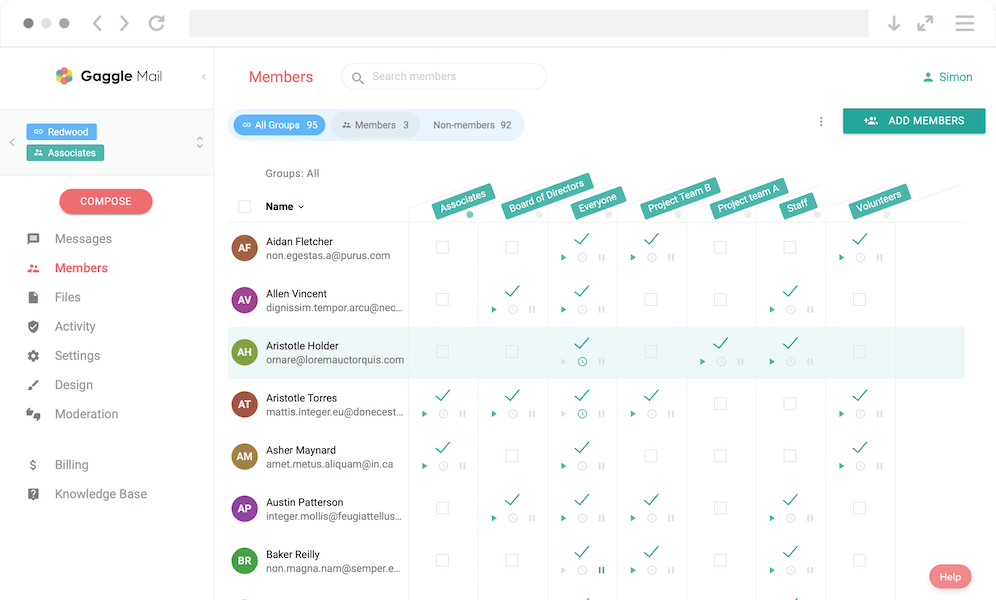
Dedicated group email services — Services like Gaggle Mail are purpose-built for group email. They provide a group email address with member management, message archives, moderation, and delivery monitoring — without requiring members to create accounts or use specific email providers. Gaggle Mail is free for groups of up to 200 members.
Self-hosted options — Technical organizations sometimes run their own mailing list software (like Mailman or Sympa) on their own servers. This gives full control but requires ongoing technical maintenance.
For most clubs, communities, and organizations wanting to create a group email, a dedicated service offers the best balance of simplicity and features. Once the address exists, keeping the member list accurate is the ongoing job; see email list management.
Shared Email Address vs Group Email
A shared email address (like info@company.com) and a group email address are related but serve different purposes.
A shared email address is typically a single mailbox that multiple people log into. It's common for customer support or sales teams. Everyone reads from and replies in the same inbox.
A group email address distributes messages to each member's personal inbox. Members read and reply from their own email accounts. There's no shared login.
The key difference is where the email lives. With a shared inbox, messages stay in one central place. With group email, every member gets their own copy. Group email is usually the better fit for organizations where members need to stay informed but don't need to collaboratively manage a single inbox queue.
Frequently Asked Questions
Ready to Create Your Group Email?
Start for free — Gaggle Mail is free for groups up to 200 members, with no credit card required.
What is a group email service?
Compare the best group email services
What people are saying
Join thousands of communities using Gaggle Mail
“Gaggle Mail transformed how our neighborhood association communicates. It's so intuitive that even our less tech-savvy members participate actively. The moderation tools are exactly what we needed.“

“Overall technical execution and ease-of-use make Gaggle Mail the best option in the market.“

“Solid, stable. Just works. Great interface. Works for everything we need.“

“Amazing alternative to google groups, which forces you to have a gmail account and is complex to join as a user.“

“Your service never fails and when we have questions, you respond immediately!“

“Outstanding service. Whenever we have a question or face an obstacle someone is there to assist.“

“It's straightforward. It works. No advertising banners. We love it!“

“The customer support is outstanding. Any questions we had while setting up our alumni network were answered promptly and thoroughly.“

“I love Gaggle Mail because I have never had a problem. It just works.“

“The migration from our old listserv was smooth and the interface is modern and clean. Our members adapted to it immediately.“

“I use it for a Boy Scout troop. I tried a couple of other applications and yours is by far the best.“