The Complete Guide · Updated September 2026
What Is a Mailing List?
A mailing list is a collection of email addresses used to send one message to many people at once. Instead of adding every recipient by hand, you write to a single list address — like book-club@example.com — and the message is automatically delivered to every subscriber.
Mailing lists have been around almost as long as email itself, and they're still one of the simplest ways for a group to communicate. Churches, neighborhood associations, clubs, nonprofits, and businesses all use them every day. This guide explains how mailing lists work, the different types, what they cost, and how to set one up.
Setting up a list for a club, board, congregation or team? Skip to how to create one ↓
Quick answer
- What it is: one email address that delivers every message sent to it out to a list of subscribers.
- The three types: announcement (one-way), discussion (two-way), and marketing (broadcast newsletters).
- Who uses them: churches, HOAs, clubs, nonprofits, schools, and professional communities.
- What it costs: free for small groups; roughly $10–$50 a month for a dedicated service.
- How to start one: a contact group in Gmail or Outlook, a free platform like Google Groups, or a dedicated group email service.
How Does a Mailing List Work?
Every mailing list has three parts: a list address (the single email address that represents the whole group), a member list (the people subscribed to it), and a list manager (the software that connects the two).
When someone sends a message to the list address, the list manager receives it and distributes a copy to every member. Members read and reply from their normal inbox — Gmail, Outlook, Apple Mail, anything. Nobody needs to install software or learn a new tool, which is why mailing lists have outlived countless "email killers."
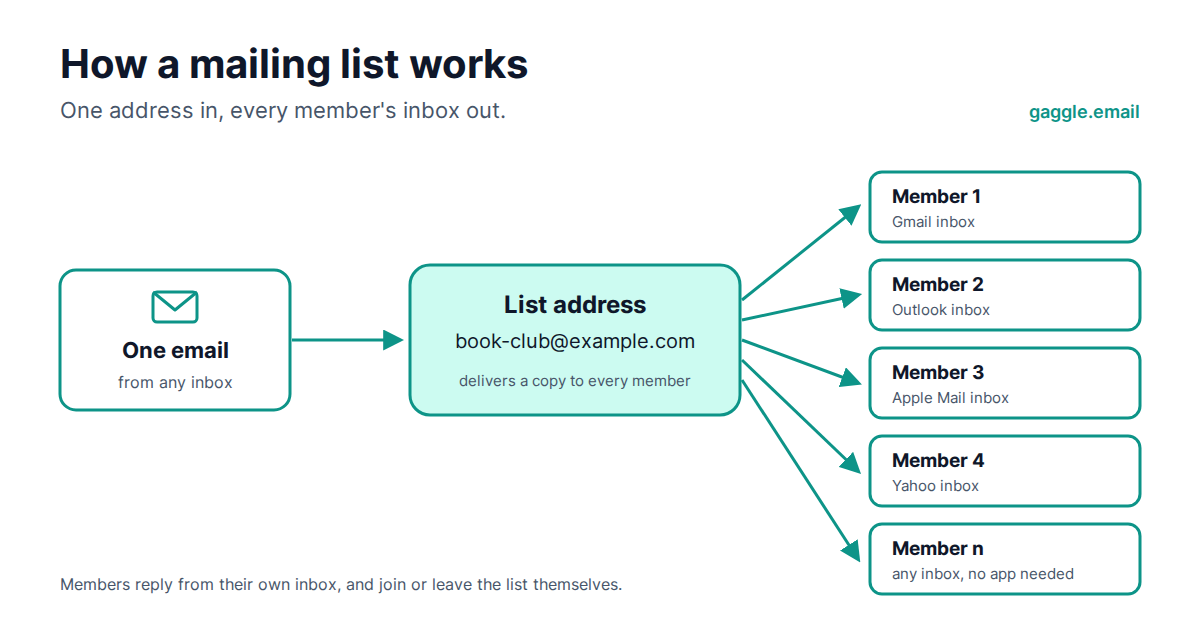
The list manager also handles the housekeeping that would otherwise fall on one volunteer: adding and removing members, processing unsubscribes, catching bounced addresses, and keeping an archive of past messages.
The Three Types of Mailing List
Not all mailing lists behave the same way. Almost every list falls into one of three types, and knowing which one you need saves a lot of frustration later.
1. Announcement lists (one-way)
Only approved senders — usually an administrator — can post, and everyone else receives. Think of a pastor's weekly update, an HOA board notice, or a school's parent bulletin. Announcement lists are the right choice when the goal is informing rather than discussing, and when you want zero risk of reply-all storms.
2. Discussion lists (two-way)
Any member can post, and every member sees every reply. This is the classic listserv model — and what most people mean by group email. Discussion lists suit book clubs, hobby groups, alumni networks, committees, and any community where the conversation is the point. Good discussion lists offer moderation tools, so an admin can approve messages or members when needed.
3. Marketing lists (broadcast)
Businesses use marketing lists to send newsletters and promotions to customers who opted in. These run on platforms like Mailchimp, are strictly one-way, and are governed by marketing regulations such as CAN-SPAM and GDPR. If that's what you're looking for, you want an email marketing tool rather than a group email service — the two solve different problems, as we unpack in group email vs email marketing.
Most searches for "mailing list" are really about the first two types — a group of real people who need to reach each other — and that's what the rest of this guide covers.
How to Create a Mailing List (3 Ways)
There are three routes, in increasing order of capability.
Option 1 — A contact group in your email client (free, small groups)
Gmail and Outlook let you save a group of addresses under one label and email them together. Fine for a dozen people you email occasionally. The catches: only you can use it, there's no unsubscribe mechanism, no archive, and providers cap daily recipients. Step-by-step guides: how to create a group email in Gmail and how to create an email group in Outlook.
Option 2 — Free platforms like Google Groups (free, more features, more friction)
Google Groups adds real list features — a shared address, an archive, member self-service. But the interface confuses non-technical members, support doesn't exist, and features have been quietly shrinking for years. If you're weighing it up, see our honest comparison of Google Groups alternatives.
Option 3 — A dedicated group email service (low cost, full control)
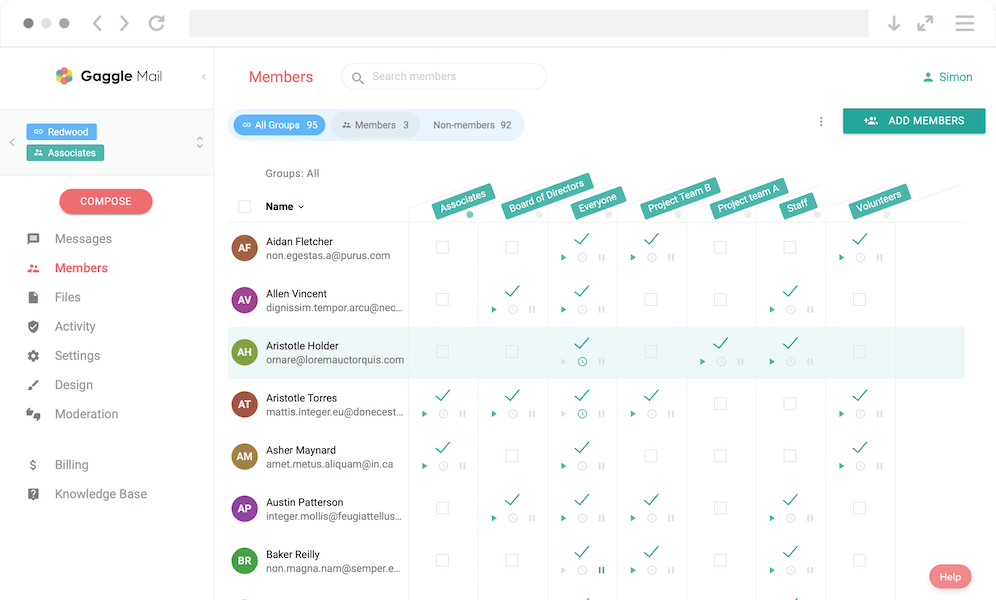
A dedicated service like Gaggle Mail gives the group a proper list address at your own name (or your own domain), one-click member management, moderation, a searchable archive, and deliverability handled for you. Setup takes about five minutes:
- Pick a list address. Something like
book-club@gaggle.email, or a list at your own domain. - Add your members. Paste in their addresses or upload a CSV; everyone gets a welcome message.
- Set who can post. Any member for a discussion list, admins only for announcements, and whether messages need approval first.
- Send your first message. Email the list address from your normal inbox and a copy lands in every member's.
- Members take it from there. They reply from their own inbox, and join or leave the list themselves.
Create your free mailing list, no credit card
Compare group email services to see the options side by side.
Mailing List vs Distribution List vs Newsletter — What's the Difference?
These terms overlap and get used loosely. Here's the practical difference.
| Term | Who can send | Typical size | Runs on |
|---|---|---|---|
| Mailing list | Members or admins (configurable) | 10–10,000+ | Dedicated list service |
| Distribution list | Anyone who knows the address | Usually under 100 | Outlook / Microsoft 365 |
| Contact group / label | Only you (it's a personal shortcut) | Small | Gmail / Outlook contacts |
| Newsletter | The organization only | Any | Email marketing platform |
| Listserv | Members or admins | Any | LISTSERV software (the original, 1986) — the word is now used generically |
The key distinction: a contact group or distribution list is a convenience for the sender — one person's address-book shortcut. A true mailing list is shared infrastructure for the whole group — anyone (with permission) can write to it, membership is managed in one place, and there's an archive. If you've ever maintained a group by pasting 40 addresses into the BCC field, you've felt the difference.
Who Uses Mailing Lists?
Mailing lists show up anywhere a group of people needs one shared address. The same pattern turns up across very different communities.
- Churches and religious organizations — weekly bulletins, prayer chains, volunteer coordination. See group email for churches.
- HOAs and neighborhood associations — official notices, resident discussion, and a written record for compliance. See group email for HOAs.
- Clubs and hobby groups — book clubs, cycling clubs, garden societies; the discussion list is the club.
- Nonprofits — board communication, volunteer scheduling, supporter updates. See group email for nonprofits.
- Schools and PTAs — class lists and parent groups that survive the annual turnover of families. See group email for education.
- Professional and academic communities — research groups and working committees have run on mailing lists for decades. See group email for associations.
What these groups share: members of every age and technical ability, no budget for IT support, and a need for communication that just works in everyone's existing inbox.
How Much Does a Mailing List Cost?
For a small group, nothing — contact groups in Gmail or Outlook are free, and dedicated services typically have free tiers (Gaggle Mail is free for up to 200 members). Paid plans for dedicated services generally run $10–$50 per month depending on member count, which buys unlimited messages, moderation, archives, and support. That's usually less than the volunteer hours spent wrestling BCC lists every month. Managing the list is the real cost; see email list management for what that involves and how to make it run itself.
If you were quoted hundreds of dollars, you found a direct-mail data broker — companies that sell address lists for postal marketing. Different product entirely.
Frequently asked questions
Have a different question and can't find the answer you're looking for? Reach out to our support team by sending us an email and we'll get back to you as soon as we can.
- What is a mailing list used for?
- A mailing list is used to send one email to a whole group at once — announcements, discussions, newsletters, and coordination for organizations like churches, HOAs, clubs, schools, and businesses. Members receive messages in their normal inbox and can reply to the whole group if the list allows it.
- Is a mailing list the same as a newsletter?
- No. A newsletter is one-way content sent by an organization to subscribers, usually via a marketing platform. A mailing list is shared infrastructure for a group — depending on settings, any member can write to it and everyone receives the message. A newsletter is one thing you can do with a mailing list.
- What does it mean if you get an email from a mailing list?
- It means someone wrote to a group address you are subscribed to, and the list software delivered a copy to you and every other member. You either joined the list yourself — a club, a committee, a newsletter you signed up for — or an administrator added you. A legitimate mailing list names the group in the footer and gives you a one-click unsubscribe link; a message from a list you have never heard of, with no way to unsubscribe, is marketing or spam.
- Do mailing lists still exist?
- Yes — millions of groups still run on them, from open-source projects and universities to churches, HOAs, and alumni networks. Email remains the only communication channel virtually everyone has, works across every age group and device, and doesn't require members to download an app. What has changed is the software: most lists now run on hosted services rather than on a server someone maintains.
- How do you maintain a mailing list?
- Keep membership current (add newcomers promptly, remove leavers), let the software handle unsubscribes and bounced addresses automatically, and review moderation settings occasionally. With a dedicated list service this takes minutes a month; the software does the rest.
- How much does a mailing list cost?
- Small lists are free using Gmail or Outlook contact groups, or the free tier of a dedicated service. Paid group email services typically cost $10–$50 per month depending on group size, including archives, moderation, and support. See our pricing.
- What is the difference between a distribution list and a shared mailbox?
- A distribution list forwards a copy of each message to every member's own inbox. A shared mailbox is a single inbox that several people log into and manage together — common for support@ or info@ addresses. Use a distribution list to broadcast to a group; use a shared mailbox when a team answers messages collectively.
Start your mailing list in five minutes.
Gaggle Mail gives your group a proper mailing list — simple enough for every member, powerful enough for thousands. Free for up to 200 members, no credit card required.
Create your free group